









MotionCam Pro revolutionizes mobile photography by offering professional-grade tools directly on your smartphone. The app's standout feature is its ability to capture RAW videos, a first for smartphone cameras. This allows photographers and videographers to retain maximum detail and flexibility during post-processing.
In addition to video capabilities, MotionCam Pro enhances still photography through advanced computational algorithms. These replace standard camera software, enabling users to produce stunning images with improved clarity, color accuracy, and dynamic range. Whether you're an amateur enthusiast or a seasoned professional, this app provides the tools needed to elevate your mobile photography experience.
MotionCam Pro stands out with its innovative features tailored for both photographers and videographers. The app's hallmark is its support for RAW video capture, allowing users to record footage with minimal compression and maximum quality. This feature is particularly beneficial for professionals who require extensive control over their video editing process.
Beyond video, the app incorporates sophisticated computational photography techniques. These algorithms work behind the scenes to optimize image capture, resulting in photos that boast superior sharpness, accurate colors, and enhanced lighting effects. Users can expect a seamless blend of powerful technology and user-friendly functionality, making high-quality photography accessible to everyone.
Furthermore, MotionCam Pro fosters a community of creators through its dedicated Discord server. Here, users can connect, share tips, and showcase their work, creating a supportive environment for learning and growth in mobile photography.
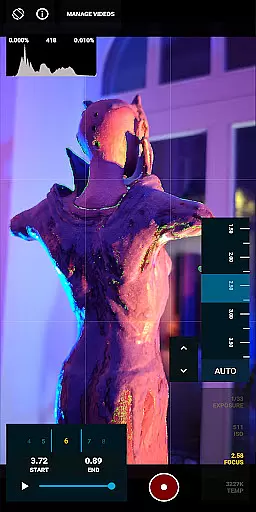
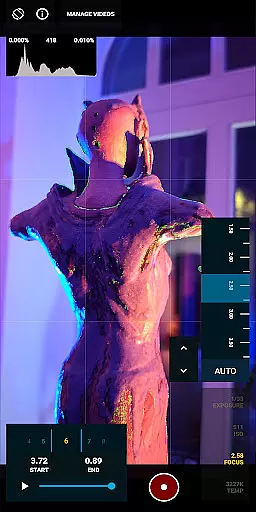
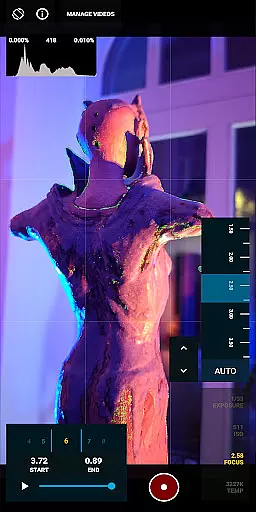
Real-time capture and preview functionality is essential for photographers who need to see the exact image they are capturing. MotionCam Pro excels in this area by providing users with a live view of their shot before taking it, ensuring precision and satisfaction with each photo.
The app employs advanced computational photography algorithms that process images instantly, giving users an accurate representation of the final output. This feature allows photographers to adjust settings such as exposure, white balance, and focus with confidence, knowing that what they see on the screen is what they will get in the final image.
With MotionCam Pro's real-time capabilities, users can take full advantage of the professional tools available directly from their smartphones. The ability to preview RAW video captures adds another layer of control, making it possible to achieve high-quality results without needing additional equipment.
MotionCam Pro takes photo enhancement to the next level with its AI beauty and enhancement features, which aim to deliver natural-looking improvements. Unlike other apps that may over-process images, MotionCam focuses on maintaining authenticity while subtly enhancing key aspects of a photograph.
The AI technology within the app intelligently identifies areas for improvement, such as skin tone correction or noise reduction, and applies enhancements that preserve the original character of the image. This ensures that every edited photo retains its unique qualities while benefiting from professional-grade touch-ups.
Photographers using MotionCam Pro can trust that their enhanced images will not only look better but also maintain a realistic appearance. By prioritizing naturalness in AI-driven edits, MotionCam empowers users to produce stunning visuals that remain true to life, elevating smartphone photography to new heights.
RAW video capture
Advanced photo algorithms
User-friendly interface
Active community support
Professional-grade tools
Premium pricing model
Steep learning curve
Limited device compatibility
High storage requirements
Occasional performance issues

A collection of tools and reference tables for DPs, ACs, DITs and Operators.
 4.70
4.70
Photo editor: face & body editor, beauty cam, filters and quality enhancer.
4.00
Photo Album Watch Face shows your favorite pictures as a Watchface.
1.90
All-in-One Editor & AI Photo Enhancer, Beautify & Retouch, Collage, Cartoonify
4.20
Add Watermark - Sign your pictures with a text or logo. Effective, quick, easy!
4.50
Find time and duration of different sunlight phases at any location
4.90
Edit like a pro with Hypic. Apply filters, AI effects, & magic touch.
4.40
Turn your phone into a professional camera - full DSLR manual photography
4.30
PhotoSync Bundle Add-On License. Enables all features and services in PhotoSync.
4.60
Photo editor: AI filters, photo enhancer, pic collage maker, AI art generator.
4.80
See your baby AI baby face generator AI baby maker Face generator babymaker fun!
4.70
1M influencer's special filter
4.60
Discover & download millions of art for The Frame TV or Hisense CanvasTV
4.60
Professional photography on your mobile phone
4.20
Transform Photos: Edit, Beautify and Craft Memories & Make Collages!
4.10
Astrophotography with your smartphone, photo live stacking and much more!
3.90
Perfect photos with body shaping, BG changer and object remover.
3.70
Pet Camera
3.70
Raw Image Viewer. Gallery with support of raw images (.cr3, .cr2, .nef, .raf).
2.00


User Reviews