
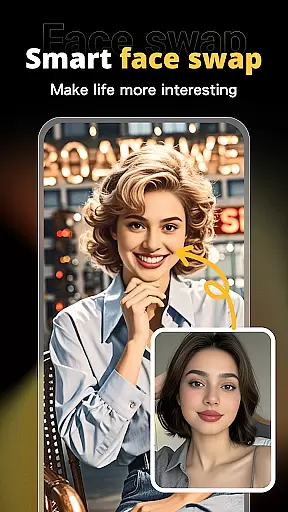
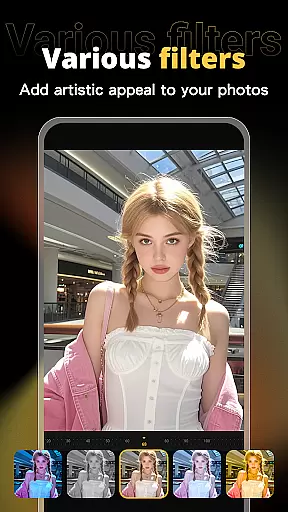



X PhotoKit is an advanced photography app designed to elevate your photo editing experience. This versatile tool combines AI-powered face swapping, comprehensive photo editing capabilities, creative collage making, and professionally designed templates. Whether you're looking to enhance personal photos or create professional-quality visuals, X PhotoKit provides all the necessary tools in one convenient package.
The app's standout feature is its intelligent AI face swap technology, which allows users to seamlessly replace faces in photos while maintaining a natural look. Additionally, its robust editing suite offers various filters, effects, and adjustment tools that help beautify images with minimal effort. With built-in templates for different occasions and easy-to-use collage and image stitching features, X PhotoKit empowers users to create stunning visuals anytime, anywhere.
X PhotoKit stands out with its diverse range of powerful features tailored for both casual and professional photographers. The app's AI face swap functionality uses advanced algorithms to ensure realistic results, allowing users to create fun and engaging content by simply uploading a selfie. This feature is perfect for social media enthusiasts looking to add excitement to their posts.
Beyond face swapping, X PhotoKit offers a complete photo editing toolkit. Users can apply numerous filters and effects, adjust lighting and color settings, and utilize precise editing tools to enhance their photos' overall quality. The app also includes creative options like photo collages and image stitching, enabling users to combine multiple images into panoramic views or artistic layouts. With intuitive design and user-friendly interface, X PhotoKit makes professional-grade photo editing accessible to everyone.
Real-time capture and preview functionality is essential for ensuring that every photo taken meets the user's expectations without delay. X PhotoKit offers a seamless experience by providing instant feedback on the photos you take, allowing you to adjust settings such as exposure, contrast, and white balance on the fly.
The app employs advanced algorithms to process images instantly, which means you can see how your adjustments affect the photo in real time. This feature is particularly useful when shooting in challenging lighting conditions or when capturing fast-moving subjects where timing is crucial.
For users, this translates into greater control over their photography, enabling them to fine-tune each shot until it perfectly matches their vision. With X PhotoKit, photographers of all levels can confidently capture moments knowing they have the tools to review and modify their work immediately.
AI beauty and enhancement features are designed to subtly improve the appearance of portraits while maintaining a natural look. X PhotoKit leverages artificial intelligence to analyze facial features and apply enhancements that preserve authenticity, avoiding the over-processed effect common in many photo editing apps.
This application intelligently smooths skin textures, enhances eye clarity, and adjusts facial contours with precision. The AI-driven tools adapt to different skin tones and types, ensuring that edits enhance rather than overshadow the subject's natural beauty.
Users benefit from these sophisticated yet easy-to-use features by achieving professional-quality results without extensive editing knowledge. Whether enhancing personal portraits or preparing images for commercial use, X PhotoKit ensures that every edit looks genuine and appealing, empowering users to present their best selves naturally.
Advanced AI face swap
Comprehensive editing tools
Variety of templates
Easy-to-use interface
Creative collage options
Limited free features
Occasional processing delays
Subscription required
High system requirements
Learning curve for beginners

Gallery show photo, video, slideshow, is perfect 3D effect private photo albums.
 4.80
4.80
How would you look like with a differently shaped nose, chin or lips?
3.90
Find time and duration of different sunlight phases at any location
4.90
Create AI Photos, Improve and restore quality of blurry, old or damaged pics.
4.20
Over 800 film simulation recipes for Fujifilm. Black Friday Offer!
4.4
Cartoon and artistic effects for your photos and videos
4.70
Gallery Slideshow is slideshow maker app for slideshow from your gallery photos.
3.90
GCamera allows all GCam features on all phone models! Better photos with GCamera
3.30
Discover & download millions of art for The Frame TV or Hisense CanvasTV
4.60
Photo prints, cards, & gifts at Walgreens. Easy ordering & fast local pickup !
4.80
Light-weight Media Gallery app for Android made with Jetpack Compose
4.60
Automatically backup your photos and videos to computer, NAS and Cloud services
4.60
Enhance, retouch & create your story - Share the moment with Photoshop Express.
4.60
AI photo editor with hair editor, retouch tools, hair color changer & filters!
4.50
AI portrait generator and polaroid AI selfie, fun AI generated AI photo creator!
4.30
Photo editor: face & body editor, beauty cam, filters and quality enhancer.
4.00
live datamoshing
4.00
Create amazing frames with up to five photos. Rounded corners, effects and more!
3.60
Add a dreamy vibe to your selfies and videos with soft style filters
4.5


User Reviews