




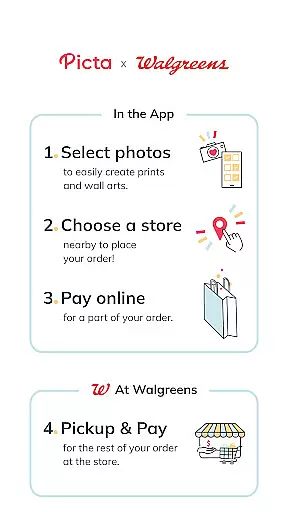
Picta is a photo printing app that allows users to print their mobile photos at Walgreens stores. With this app, you can easily select your photos, choose the print size and quantity, and pick up your prints within an hour at your nearest Walgreens store. The app offers professional-quality photo printing services on Kodak paper in multiple sizes, including 4x6, 5x7, and 8x10 enlargements. Additionally, it provides features such as creating personalized photo gifts, organizing photos by date taken, and offering exclusive deals for app users.
Whether you want to print individual photos or create photo collages, Picta has got you covered. You can also crop and zoom each picture easily within the app. The app's enhanced Walgreens store locator makes it convenient to find your local store or even send prints to friends and family. With fast and safe photo transfer, real-time order status updates, and the ability to pay in-store, Picta offers a seamless photo printing experience.
Picta offers a range of features that make photo printing easy and convenient. Firstly, it provides professional-quality photo printing services on Kodak paper in various sizes, allowing users to choose from options like 4x6, 5x7, and 8x10 enlargements. Additionally, users can create personalized photo gifts for all occasions, such as magnets, posters, canvas prints, photobooks, greeting cards, and invitations.
The app also includes an enhanced Walgreens store locator, which helps users find their nearest store for quick pickup. Users can track their order status in real time and benefit from Walgreens' unique service by paying in-store only if they are satisfied with the quality of the prints. Moreover, Picta offers exclusive deals and coupons for app users, providing additional savings and rewards.
Other notable features include the ability to organize photos by date taken, fast and safe photo transfer, and the option to create photo collages in different layouts. Whether you want to print individual photos or create customized gifts, Picta offers a comprehensive set of tools to enhance your photo printing experience.
Real-time capture and preview functionality is essential for ensuring that users can accurately select and edit their photos before printing. The Picta app offers a seamless experience by allowing users to choose photos directly from their mobile devices with instant previews.
This feature enables users to crop and zoom each picture easily within the app, providing precise control over how their final prints will look. By offering real-time adjustments, the app ensures that every photo meets the user's expectations before it is sent for printing.
The ability to preview edits in real time significantly enhances the overall user experience. Users can experiment with different print sizes, such as 4x6, 5x7, or square formats, seeing exactly how each option affects their images. This immediate feedback empowers users to make informed decisions about their photo prints.
Ultimately, real-time capture and preview streamline the entire photo printing process. With this feature, customers save time and effort, avoiding dissatisfaction with their prints upon pickup. It guarantees that when they collect their photos at a Walgreens store, they are satisfied with the results, reinforcing trust in the service provided by Picta.
AI beauty and enhancement features have become increasingly important in photography apps, aiming to improve image quality while maintaining natural aesthetics. Picta incorporates advanced AI algorithms to enhance photos without compromising their authenticity, ensuring that every print reflects genuine moments captured by users.
These AI enhancements include automatic color correction, brightness adjustment, and sharpness optimization, all designed to elevate the visual appeal of mobile photos. By using sophisticated machine learning models, the app intelligently applies these enhancements, preserving the original essence of the photographs.
The emphasis on naturalness means that edited images retain their realistic qualities, avoiding overly processed appearances. Users benefit from professional-grade touch-ups that highlight the best aspects of their photos, whether they're creating personalized gifts like magnets, posters, or photobooks, or simply ordering standard prints.
By integrating AI-driven enhancements, Picta not only improves photo quality but also simplifies the editing process for users. This technology allows individuals to achieve stunning results effortlessly, enhancing their satisfaction with both digital and printed outputs. As a result, customers enjoy high-quality prints that truly represent their cherished memories.
User-friendly interface
Wide range of print sizes
Fast and convenient pickup
Exclusive deals for app users
Professional-quality prints
Limited to Walgreens stores
Requires internet connection
Additional charges for premium features
Occasional technical issues
Print quality may vary

Easily stitch panoramas from multiple photos or video.
 4.40
4.40
Natural Beauty, Selfie Retouch
4.30
Perfect body tune & face app - photo retouch, makeup, slim body & beautify face.
4.80
Transform photos into videos! Create realistic or anime-style images easily!
4.50
Smart, light, and fast photo and video gallery
4.30
live datamoshing
4.00
Your personal guide to the sun and moon. Plan ahead, visualize and predict!
4.70
Discover How to Plan any Sun, Moon and Milky Way Photo You Imagine in Seconds
4.70
Try an anime version, cartoon yourself, and generate AI hug or aging videos!
3.70
Photo editor: AI filters, photo enhancer, pic collage maker, AI art generator.
4.80
Viewfinder, Light meter, Reciprocity failure time, DOF & Bellows Extension
4.60
PhotoSync Bundle Add-On License. Enables all features and services in PhotoSync.
4.60
Create collages easily! Nice pic collage maker & background eraser for Instagram
4.50
Search, tag and rate your way to an organized image gallery
4.40
All-in-One Editor & AI Photo Enhancer, Collage, Cartoonify, Funny Stickers & BGS
4.10
Create & Edit with AI: AI Remove, Enhance, Retouch, Filter
4.10
How would you look like with a differently shaped nose, chin or lips?
3.90
HD Photo gallery and photo manager to edit, hide private photos, videos & albums
4.2
Add a dreamy vibe to your selfies and videos with soft style filters
4.1


User Reviews