


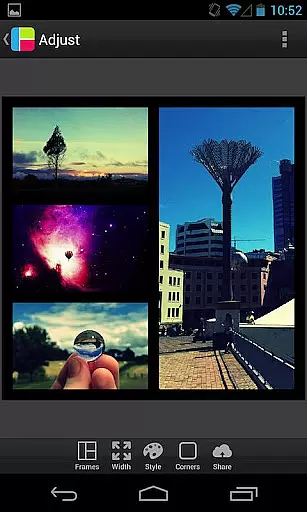
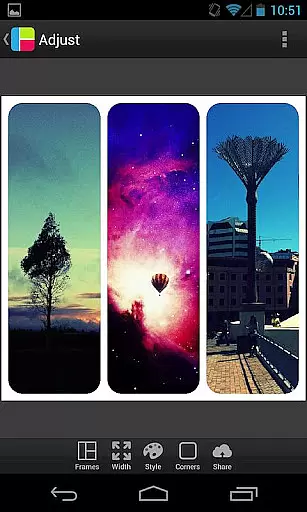

PicFrame is a versatile photography app that allows users to create stunning photo collages by combining multiple images into customizable frames. With 36 adjustable frame layouts, users can include up to five photos in a single frame, offering endless creative possibilities. The app provides advanced editing tools such as rounded corners, shape customization, and precise control over borders, colors, and patterns. Whether you're looking to enhance your social media posts or create personalized gifts, PicFrame delivers professional-quality results with ease.
The app's intuitive interface makes it accessible for both casual users and photography enthusiasts. Key features include adjustable photo effects, brightness/contrast controls, and support for various aspect ratios. Users can zoom, rotate, and reposition their photos with precision. Once completed, collages can be saved in multiple resolutions or directly shared to platforms like Instagram, Facebook, and Twitter. This combination of powerful editing tools and seamless sharing options makes PicFrame an essential tool for anyone interested in digital photography.
PicFrame stands out with its comprehensive set of design and editing features tailored for creating unique photo collages. The app offers 36 fully customizable frame layouts, allowing users to adjust inner borders and experiment with different configurations. Advanced customization options include changing photo shapes to circles, hearts, or hexagons, and applying 52 distinct background patterns. The border width and color can be fine-tuned using an easy-to-use color picker, ensuring each creation has a personal touch.
Photography enthusiasts will appreciate the app's detailed editing capabilities. Each photo within a frame can have its brightness, contrast, and saturation individually adjusted. The pinch-to-zoom functionality and precise photo positioning enable perfect composition. PicFrame supports multiple aspect ratios including square format (ideal for Instagram), and finished collages can be exported in various resolutions. These professional-grade features, combined with direct sharing to social media platforms and other applications, make PicFrame a complete solution for creative photo editing.
Real-time capture and preview functionality is essential for photography apps as it allows users to see exactly what the final image will look like before taking a photo. PicFrame offers this feature by enabling users to adjust various settings such as brightness, contrast, and saturation in real time.
The app provides an interactive interface where users can pinch to zoom and drag to move photos within frames, ensuring precise placement and composition. This immediate feedback empowers users to make necessary adjustments on the fly, enhancing their creative control over the final output.
With PicFrame's real-time capabilities, users can experiment with different photo effects, shapes, and border widths without any lag, providing a seamless editing experience. The ability to instantly visualize changes ensures that users can achieve their desired aesthetic efficiently.
AI beauty and enhancement features are becoming increasingly popular in photography apps, offering tools that automatically improve image quality while maintaining a natural look. PicFrame incorporates such functionalities by allowing users to apply adjustable photo effects that enhance the visual appeal of their images.
The app includes options to modify the shape of photos into hearts, circles, hexagons, and more, adding a creative flair that enhances the overall presentation. Additionally, the easy-to-use color picker for borders ensures that enhancements complement the photo's content, preserving its authenticity.
PicFrame's AI-driven enhancements focus on delivering professional-quality results without over-processing, striking a balance between improved aesthetics and genuine representation. Users can trust that their shared memories will retain their original charm while benefiting from subtle yet impactful improvements.
User-friendly interface
Extensive customization options
High-quality output resolution
Direct social media integration
Versatile frame designs
Limited to five photos per frame
Some features may feel complex for beginners
No automatic enhancement option
Occasional performance lags
Subscription required for full feature access

[3DSteroid Pro] is a stereoscopic application for Android.
 4.30
4.30
Viewfinder, Light meter, Reciprocity failure time, DOF & Bellows Extension
4.60
Create Business Headshots, Polaroid Filter, Retake Photos,Profile Pics,AI Photos
4.50
Amazing Photo Effects - The most fun you can have with your photos!
4.70
See your baby AI baby face generator AI baby maker Face generator babymaker fun!
4.70
Collage your moments in one tap: 1000+ layouts, filters, stickers, and texts.
4.90
PhotoSync Bundle Add-On License. Enables all features and services in PhotoSync.
4.60
Welcome to ProShot, the most powerful camera app on Android.
4.20
Edit photos with the picture generator: PS2 & AI Clay filters, cartoon effects.
4.50
Create funny photos and videos with the popular Time Warp Scan filter.
4.90
Photo editor: AI filters, photo enhancer, pic collage maker, AI art generator.
4.80
Your personal guide to the sun and moon. Plan ahead, visualize and predict!
4.70
AI photo editor with hair editor, retouch tools, hair color changer & filters!
4.50
Edit like a pro with Hypic. Apply filters, AI effects, & magic touch.
4.40
Professional camera app that brings DSLR manual photography controls to Android.
4.20
All-in-One Editor & AI Photo Enhancer, Collage, Cartoonify, Funny Stickers & BGS
4.10
Photobooth mini FULL app will allow you to add more fun to your parties
4.00
Professional quality photo edits with the new Snapseed.
4.00
Over 800 film simulation recipes for Fujifilm. Black Friday Offer!
4.0


User Reviews