
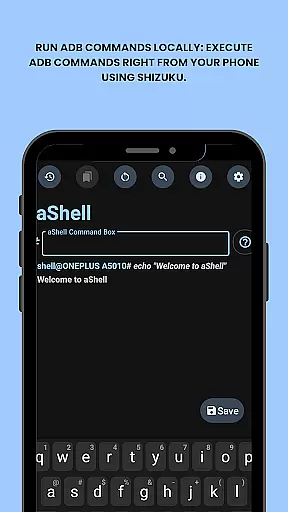
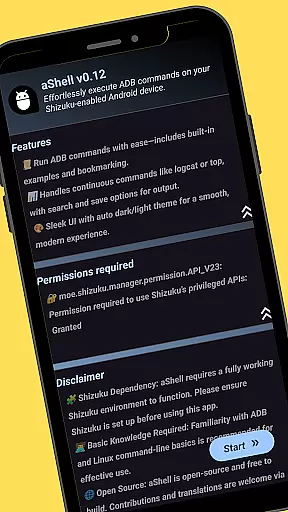
aShell is a specialized Android tool that allows users to execute ADB commands directly from their mobile device without requiring a PC. Designed for developers and power users, it operates within a Shizuku-enabled environment, offering advanced control over device internals.
Key features include preloaded command examples, live command output support, and the ability to save outputs to files. Its intuitive interface supports dark/light mode and provides bookmarking functionality for frequently used commands. This makes aShell an ideal solution for debugging, monitoring, or managing Android systems efficiently.
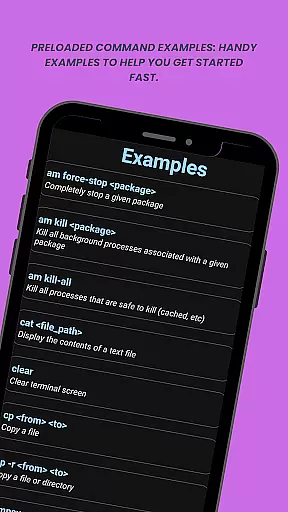
aShell stands out with its unique integration of Shizuku, enabling seamless execution of ADB commands on Android devices. The app includes practical examples of common commands, making it easier for users to get started even with basic ADB knowledge.
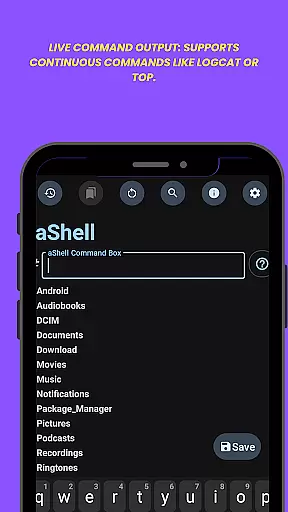
Advanced functionalities such as live command output for continuous processes like logcat, search capabilities within results, and export options enhance usability. Additionally, customization features like theme adaptation and command bookmarks cater to both novice and experienced users seeking precision and convenience in their workflows.
aShell delivers exceptional core functionality by enabling users to execute ADB commands directly on their Android devices. This eliminates the traditional requirement of a PC for ADB operations, offering a streamlined solution for developers and power users.
The app leverages a fully functional Shizuku environment to ensure accurate command execution. With features like live command output for continuous processes such as logcat or top, users can monitor real-time results with precision.
Additionally, aShell supports saving command outputs to .txt files, allowing users to maintain records or share results effortlessly. The inclusion of preloaded command examples further enhances usability, making it easier for users to get started quickly.
By combining these capabilities, aShell ensures both accuracy in executing complex commands and effectiveness in delivering a seamless mobile ADB experience.
aShell excels in providing an intuitive and user-friendly interface that simplifies the complexities of ADB command execution. Designed with both novice and experienced users in mind, the app offers a clean layout that adapts automatically to dark or light modes based on system settings.
Key functionalities are easily accessible, including the ability to search within command outputs and bookmark frequently used commands for quick access. These features reduce the learning curve typically associated with command-line tools.
The app also includes handy examples of common ADB commands, ensuring that even those with basic ADB knowledge can operate it effectively. Its straightforward design minimizes unnecessary clutter, focusing instead on delivering essential tools efficiently.
Overall, aShell's interface strikes a perfect balance between simplicity and advanced functionality, making it an ideal choice for anyone seeking full control over their device's internals without compromising ease of use.
Lightweight design
Easy-to-use interface
Live command output
Dark/Light mode
Bookmark functionality
Requires Shizuku
Limited to tech-savvy users
No offline help
Dependent on ADB
Paid version only

An easy-to-use calculator designed to save time calculating and bending conduit
 4.30
4.30
Navigate with Ease and Style
4.90
Signal Strength, Mobile, Wifi, Speed Test, Bad Signals, Cellular, 5G, LTE, 4G
4.20
Monitor car performance in real time and troubleshoot malfunctions.
4.80
WiFi Signal Strength Meter help you detect WiFi Signal Strength in real time.
4.80
Connect wirelessly to your computer to watch movies, browse the web, play games
5.00
A simple app to back up and restore SMS & MMS messages and call logs.
4.10
Clean up your phone, find files, play media, and share files offline
4.50
Enjoy a smooth mobile reading experience!
3.60
The ultimate tool for network analysis, wifi scanning and problem detection.
4.90
The one-and-only remote control for PC, Mac, and Linux
4.70
Protect your device with antivirus, storage cleanup, and system monitoring
4.70
HD Video player and downloader for all formats, fast & smooth 4K video playback.
4.60
Planner and Tracker for Stardew Valley
4.60
Clean up large files and similar photos, fast and easy to use
4.40
pdf merge, word to pdf, jpg to pdf, edit pdf, convert to pdf and much more!
4.20
Just one-tap to easy translate in any language after calls within seconds.
4.20
Automate everything from settings to photos, SMS to speech. ADC2 prize winner.
4.10
Download any file easily and quickly with Downloader
4.5


User Reviews