
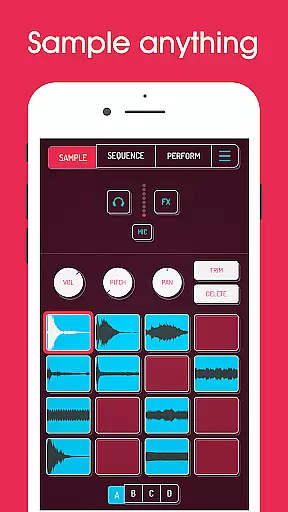
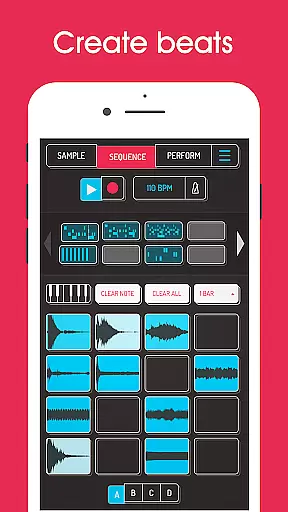
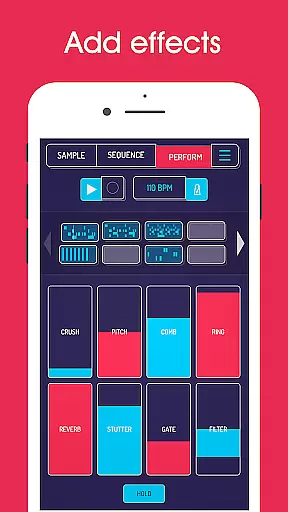
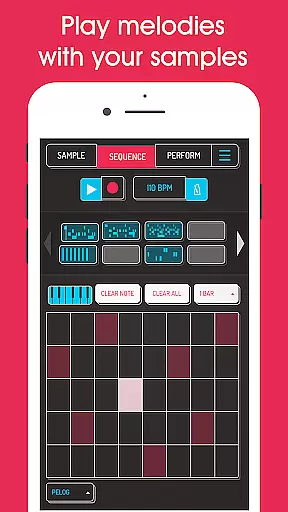
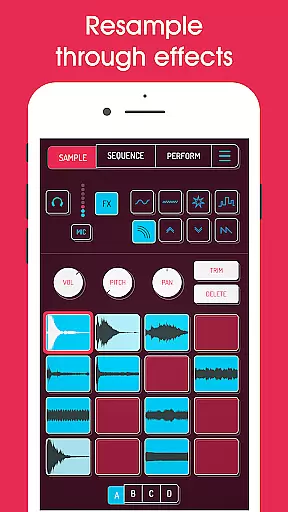
Koala Sampler is a pocket-sized music production tool that allows users to record sounds through their phone's microphone or import custom samples. Designed for both amateur beatmakers and professional musicians, this app provides an intuitive interface for creating tracks quickly and efficiently. With features like AI-powered sample separation, 16 built-in effects, and high-resolution sequencing, Koala Sampler makes music creation accessible and fun.
The app supports up to 64 different samples, each with adjustable attack, release, and tone settings. It also includes advanced functionalities such as resampling, MIDI control, and swing quantization. Whether you're transforming your voice into an instrument or crafting complex beats, Koala Sampler keeps the creative process flowing without overwhelming users with unnecessary parameters.
Koala Sampler offers a comprehensive suite of tools for music creation. The app includes 16 high-quality effects ranging from reverb to bit-crusher, allowing users to manipulate sounds in unique ways. Its AI-driven sample separation feature can isolate drums, bass, vocals, and other elements from imported audio files, providing unparalleled flexibility in track composition.
One standout feature is the ability to resample the app's output back into the input, enabling endless sonic experimentation. The high-resolution sequencer lets users create detailed beats while keyboard mode supports chromatic playing across nine scales. Additional functionalities include note repeat, mute/solo controls, and mix-wide effect application. These robust features make Koala Sampler a versatile choice for mobile music production.
Koala Sampler offers an extensive music library that allows users to record up to 64 different samples using their phone's mic. This vast capability ensures a rich diversity of sounds, which is crucial for creative freedom.
In addition to recording, the app supports importing your own samples, thus expanding the library further with personal and copyrighted content. The ability to use AI to separate samples into individual instruments like drums, bass, vocals, and others adds another layer of depth to the library.
With professional-quality WAV file export options, Koala Sampler assures that all creations maintain their authentic sound without any quality loss. This feature is essential for musicians who require high standards in their work.
The app also includes 16 superb built-in effects and 8 microphone FX, enhancing the authenticity of each sample while providing users with tools to modify their sounds creatively and legally.
Audio quality is paramount in music production, and Koala Sampler excels by offering various options to ensure the best output. Users can adjust attack, release, and tone on each sample, allowing precise control over the audio characteristics.
The inclusion of high-resolution sequencer and quantization features means that beats created within the app are tight and professional-sounding. These functionalities help in crafting tracks that stand out due to their clarity and precision.
Moreover, the app provides swing settings to get the right feel, alongside mute/solo controls and note repeat options, ensuring that every aspect of the track can be fine-tuned to perfection.
Finally, the availability of 16 DJ Mix FX, including bit-crusher, pitch-shift, reverb, and more, gives users the power to enhance their mixes with industry-standard effects, resulting in polished and dynamic audio productions.
Intuitive user interface
Powerful AI sample separation
Extensive built-in effects
High-quality export options
MIDI compatibility
Limited free features
Occasional audio glitches
Steep learning curve
In-app purchases required
Heavy battery usage

Fun & Easy Voice Changer – Record, Edit & Add Hilarious Effects!
 4.50
4.50
Simply convert wav to mp3. Clear. Reliable. Safe.
4.4
Offline and always ad-free - stream in the highest quality available.
4.10
10-Band Audio Equalizer, Sound / Bass Booster for Spotify Users & Music Players
4.40
The alternative folder based music player.
4.20
Enjoy singing any song, no matter how high or low it is
4.30
The official Sonos app
4.10
Full featured mp3 and audio player with Chromecast and Android Auto support.
4.40
Listen to offline music and sounds from all categories
4.70
Make songs with AI! Any genre, custom lyric, song generator for music creation!
4.80
Gorgeous UI, Powerful music Search and Equalizer, the great choice for you!
4.70
Over 100 million tracks available for high quality streaming and download
4.60
Super Sound Editor, Song Maker & Mixer, Vocal Remover, Voice Recorder & Changer!
4.60
Your HD audio recorder on the go for music, meetings, ambience, animal sounds…
4.30
A sleek, no-frills player designed for true music lovers.
4.20
Smart piano keyboard, Classical to Pop, Real-time multiplayer connection!
4.20
Permanently backup Now Playing. Maps, filters & listening stats.
4.00
The only true audiophile music player with Hi-Fi audio rendering and DSP engine
3.90
The iconic iOS metronome app is now on Android.
3.70


User Reviews