
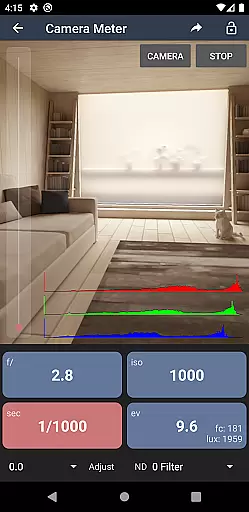
Light Meter is a comprehensive photography tool that combines multiple essential functions in one app. It features both reflected light metering using the device's camera and incident light metering through the built-in light sensor, ensuring accurate readings comparable to professional Gossen and Sekonic meters. The app caters to a wide range of photographers, from film SLR users to cinematographers.
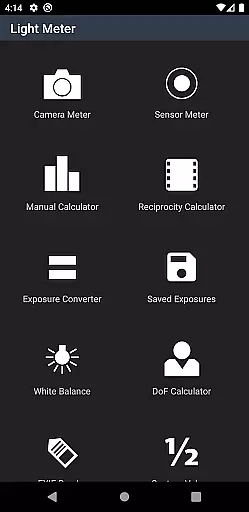
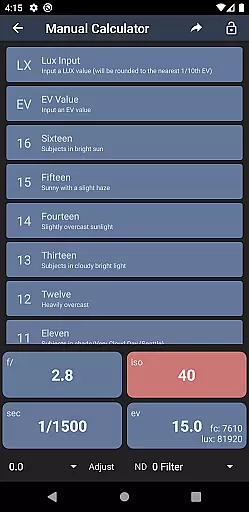
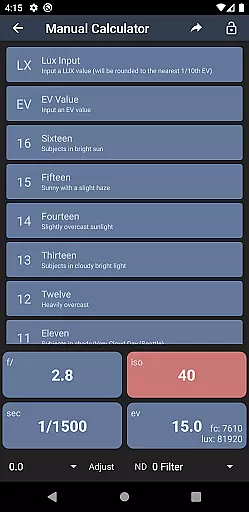
In addition to its core light metering capabilities, Light Meter offers several advanced tools including a Color Temperature meter for white balance adjustments, a Reciprocity Calculator for long exposures, an Exposure Convert for various ISO settings, a Manual (Sunny Sixteen) calculator, a Depth of Field calculator, and an EXIF Reader for analyzing image metadata. These features make it an indispensable companion for photographers seeking precision and versatility in their work.
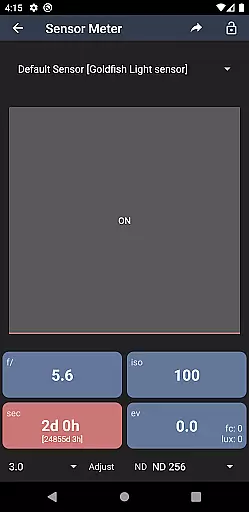
Light Meter stands out with its dual light metering system, providing both spot and incident light measurements. The spot metering utilizes the smartphone's camera to measure reflected light, while the incident meter uses the ambient light sensor for direct illumination readings. This dual approach ensures reliable exposure calculations across different shooting conditions.
Beyond light measurement, the app includes specialized tools such as a Color Temperature meter for achieving perfect white balance, a Reciprocity Calculator for handling reciprocity failure in long exposures, and an Exposure Convert for adjusting between different film speeds. Additional features like the Manual (Sunny Sixteen) calculator, Depth of Field calculator, and EXIF Reader further enhance the photographer's toolkit, offering solutions for exposure calculation, focus planning, and image analysis.
The combination of these features makes Light Meter suitable for various photography styles, from traditional film to modern digital and even cinematography. Its accuracy and versatility provide significant value to both amateur and professional photographers looking to refine their craft.
Real-time capture and preview functionality is essential for photographers who need accurate exposure readings. Light Meter offers both spot metering through the device's camera and incident light metering via the built-in light sensor.
This dual capability ensures that users can measure light reflections and ambient light conditions with precision, providing reliable data for various photography setups. The app has been rigorously tested against industry-standard Gossen and Sekonic meters, ensuring its accuracy across different devices.
Photographers benefit from real-time feedback, allowing them to adjust settings on the fly and achieve optimal exposure in diverse shooting environments. This feature is particularly useful for film SLR, pinhole, and cinematographic cameras where manual adjustments are crucial.
While primarily a tool for professional and amateur photographers, Light Meter also includes features that enhance image quality beyond just exposure. One such feature is the Color Temperature meter, which helps in achieving correct white balance settings.
In addition to the light metering tools, the app provides several calculators including Reciprocity, Exposure Conversion, Manual (Sunny Sixteen), and Depth of Field. These tools collectively assist in refining the photographic process by offering precise calculations needed for perfect shots.
The inclusion of an EXIF Reader further extends the utility by allowing users to review detailed metadata of their images. This comprehensive suite of features ensures that every aspect of photography, from capture to post-processing, is covered with natural enhancement and beauty in mind.
User-friendly interface
Accurate light readings
Comprehensive toolset
Wide device compatibility
Regular updates
Premium version required
Limited free features
Occasional sensor errors
High battery usage
Complex for beginners

Viewfinder, Light meter, Reciprocity failure time, DOF & Bellows Extension
 4.60
4.60
How old age camera Gender Swap App Face Shape Hairstyle App Hair Styler App fun!
4.00
Transform photos into videos! Create realistic or anime-style images easily!
4.50
Future baby face generator: AI kids generator, kid face! What my baby look like?
4.40
Transform Photos: Edit, Beautify and Craft Memories & Make Collages!
4.10
Pro version: AR sun/moon tracker for any date. Tool for photographers & planners
4.90
RAW video capture with advanced controls
4.40
The original Rarevision VHS look seen everywhere!
4.70
Discover & download millions of art for The Frame TV or Hisense CanvasTV
4.60
Perfect body tune & face app - photo retouch, makeup, slim body & beautify face.
4.80
Photo prints, cards, & gifts at Walgreens. Easy ordering & fast local pickup !
4.80
Amazing Photo Effects - The most fun you can have with your photos!
4.70
Light-weight Media Gallery app for Android made with Jetpack Compose
4.60
Automatically backup your photos and videos to computer, NAS and Cloud services
4.60
AI photo editor with hair editor, retouch tools, hair color changer & filters!
4.50
Natural Beauty, Selfie Retouch
4.30
Photo editor: face & body editor, beauty cam, filters and quality enhancer.
4.00
Superimpose one photo on top of another using the original Superimpose app!
3.20
Long exposure camera with computational photography
2.60


User Reviews