
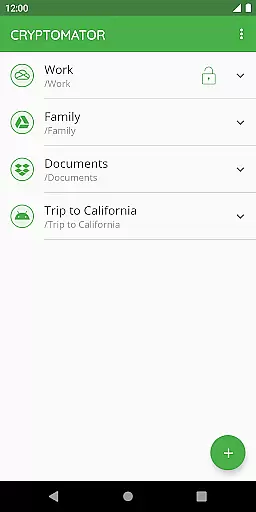
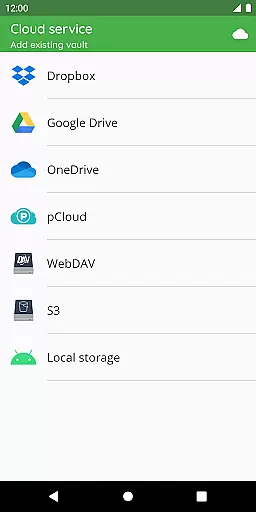
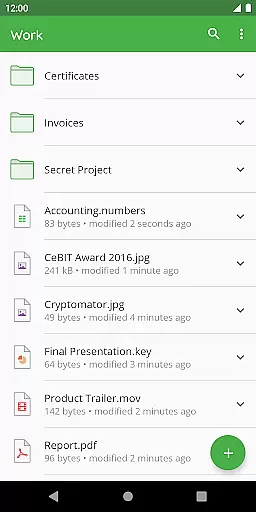
Cryptomator is a powerful productivity tool designed to secure your sensitive data through encryption. This application allows users to create secure vaults, protecting files stored in popular cloud services like Dropbox, Google Drive, and OneDrive. With its user-friendly interface, Cryptomator makes encryption accessible to everyone, ensuring that your data remains private and under your control.
One of the standout features of Cryptomator is its compatibility with various platforms and cloud storage services. Whether you're using Android, iOS, Windows, or macOS, this app ensures seamless access to your encrypted files across all devices. The implementation of AES-256 encryption guarantees top-tier security, while additional features such as automatic vault locking enhance protection when the app is not in use.
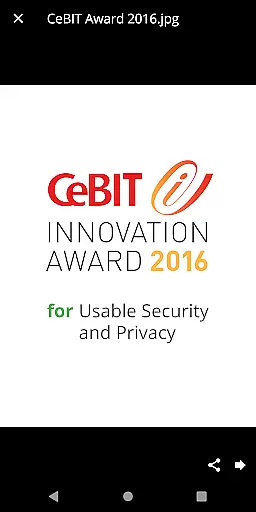
The application's open-source nature provides transparency, allowing tech-savvy users to verify the integrity of its encryption methods. With recognition from awards like the CeBIT Innovation Award, Cryptomator has proven itself as a reliable solution for safeguarding digital privacy. Its active community support further enriches the user experience, making it an essential tool for anyone concerned about data security.
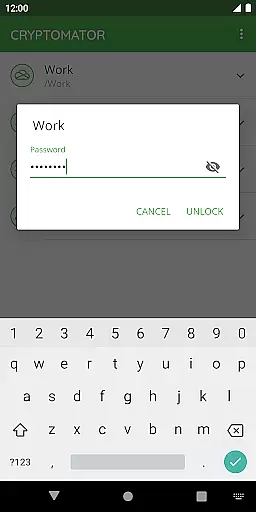
Cryptomator offers a comprehensive suite of features that cater to both security-conscious individuals and businesses. At its core, the app provides robust encryption capabilities using AES-256 and scrypt technologies, ensuring that file contents and filenames remain confidential. Users can easily create vaults by assigning passwords, eliminating the need for additional accounts or complex configurations.
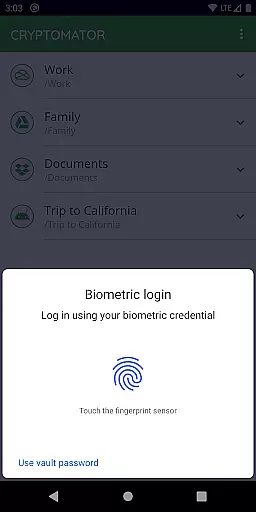
Another notable feature is its cross-platform compatibility. Cryptomator supports major cloud storage providers including Dropbox, Google Drive, and OneDrive, along with WebDAV-based services. This flexibility enables users to encrypt files locally before uploading them to their preferred cloud service. Additionally, the app supports biometric authentication, allowing quick and secure access via fingerprint scanning on supported devices.
Beyond encryption, Cryptomator emphasizes usability without compromising security. Vaults automatically lock when the app enters the background, preventing unauthorized access. Furthermore, the app's open-source codebase invites scrutiny from the developer community, reinforcing trust in its security protocols. These features collectively make Cryptomator an indispensable tool for maintaining privacy in today's digital landscape.
In the realm of productivity, effective task management stands as a pivotal element. Cryptomator excels in providing users with robust tools to manage their digital security tasks efficiently. The application allows you to create secure vaults effortlessly, where each vault acts as an encrypted container for your sensitive data.
With Cryptomator, assigning a password to your vault is all it takes to initiate protection. This straightforward approach eliminates the need for additional accounts or complex configurations, streamlining the process of safeguarding your information. Moreover, the convenience of unlocking these vaults with a fingerprint adds another layer of accessibility and security.
The true power of Cryptomator's task management capability lies in its seamless integration with various cloud services. Whether you're using Dropbox, Google Drive, or other cloud storage solutions, Cryptomator ensures that your files are encrypted before they reach the cloud, giving you peace of mind and full control over your data's safety.
Cross-device synchronization is essential for users who require access to their data across multiple platforms. Cryptomator shines in this area by offering reliable synchronization that keeps your encrypted files up-to-date on all your devices. Once you've set up your vault on one device, accessing it from another is a hassle-free experience.
The application supports Androidu2019s local storage, which means you can use third-party sync apps to maintain consistency across different environments. This flexibility ensures that no matter where you are or what device you're using, your data remains accessible and secure.
Security does not have to come at the expense of convenience. With Cryptomator, any changes made to your vaults are automatically synchronized, ensuring that your latest work is always available. This feature is particularly beneficial for users who travel frequently or work in diverse locations, as it guarantees that their data is both current and protected.
Strong encryption standards
User-friendly interface
Cross-platform compatibility
Active community support
Regular updates and improvements
No built-in cloud storage
Limited free features
Occasional performance lags
Requires technical knowledge
Fingerprint unlock not universal

A lightweight JSON & XML files creator, editor and viewer (Premium Version)
 4.40
4.40
Protect and view your important info on your phone and tablet with eWallet®
4.80
Customizable calendar widget for seamless event sync, planning & scheduling.
4.00
CalenGoo is a very flexible and feature-rich calendar app
4.40
A beautiful digital clock with autostart and many other functions
4.70
A simple Whisper AI keyboard for reliable speech transcription and rewording
4.60
A Pixel Art watchface inspired by other iconic 90s designs for Wear OS devices!
4.40
Lightweight PDF, Word, Excel reader.
4.60
Note taking, handwriting, record audio, PDF annotation, planner & journal
4.20
8 custom complications. Custom Time Fonts. Beautiful color schemes. A++ Design.
5.00
Understand anything with a personalized AI research assistant
4.80
Secure, fast, open-source, VNC and SSH Remote Desktop for Windows, Linux and Mac
4.70
Fill, sign & send docs, forms, agreements & contracts via electronic signature.
4.50
When you Focus, so will your Bean in this cozy focus timer
4.30
Unlock AutoNotification
4.00
Simple and reliable communication between inmates, friends and family
3.20
Easiest event planning, volunteer signups & parent teacher conference scheduling
2.20
A simple, portable logger for POTA, SOTA, Field Day, and more
4.0
A comprehensive suite of tools designed specifically for Lactation Consultants
4.1


User Reviews