



PhotoPills is a comprehensive photography planning tool designed to unlock your creative potential. This app specializes in turning imaginative Sun, Moon, and Milky Way scenes into real photographs, making it an essential companion for photographers aiming to capture legendary images. With features like the 2D Map-Centric Planner, Augmented Reality views, and various calculators, PhotoPills provides everything you need to plan and execute your creative ideas.
The app's unique tools such as the Sun, Moon Alignments Fast Finder and 3D Augmented Reality views allow users to foresee celestial events and plan shoots with precision. Whether capturing landscapes, night skies, or special events, PhotoPills ensures that every element aligns perfectly for that ideal shot. Its intuitive interface and detailed planning capabilities make it suitable for both amateur and professional photographers.
PhotoPills stands out by offering practical utilities like the Photo Plans Manager and Location Scouting Tool, which help organize and optimize photo sessions. By providing key information on sunrise/set, twilight times, and moon phases, it empowers photographers to anticipate and capture fleeting moments. The app's endorsement by renowned photographers further attests to its value, ensuring users can achieve extraordinary results every time they pick up their camera.
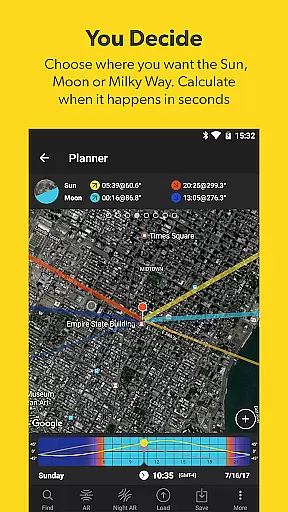
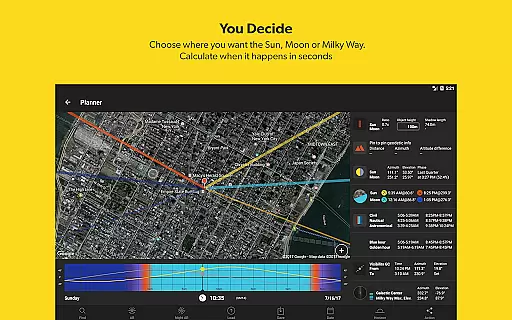
PhotoPills boasts a wide array of features tailored to meet the needs of photographers. One standout feature is the First 2D Map-Centric Planner, which allows users to visualize and plan Sun, Moon, and Milky Way shots with remarkable accuracy. This planner helps photographers determine the exact dates and times when desired celestial events will occur, streamlining the planning process significantly.
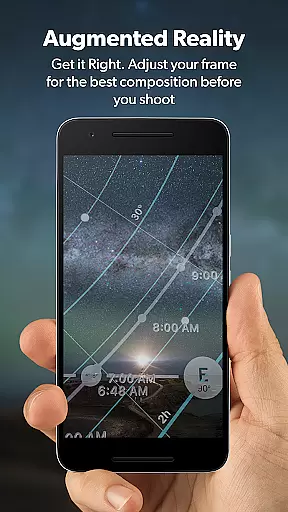
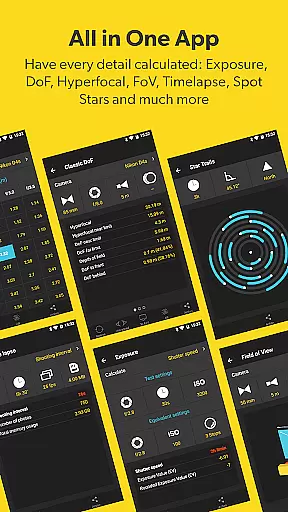
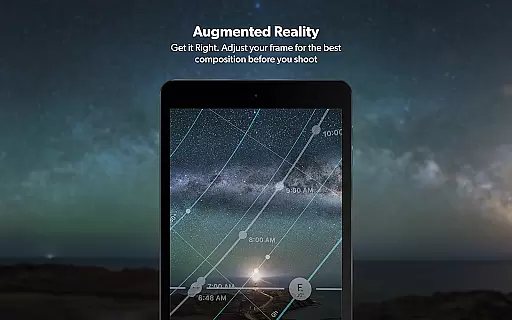
In addition to the planner, PhotoPills offers 3D Augmented Reality views for Sun, Moon, Milky Way, Celestial Equator, Polaris, Depth of Field (DoF), and Field of View (FoV). These AR views enable users to preview how celestial bodies will appear in their chosen location, allowing for precise adjustments before shooting. The app also includes widgets and calculators for long exposure, timelapse, spot stars, star trails, hyperfocal table, DoF, and FoV, enhancing the photographer's ability to capture perfect shots.
Another notable feature is the Photo Plans Manager, which lets users create a To-Do list of planned photos and ensures they never miss an unmissable scene. Coupled with the Location Scouting Tool, photographers can explore, discover great places, and save them as Points of Interest. These innovative features collectively ensure that photographers can focus on creativity while PhotoPills handles the technical details, making it an indispensable tool for modern photography.
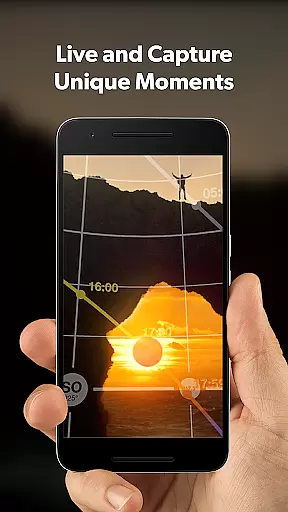
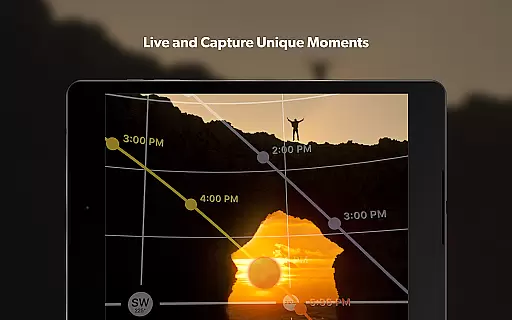
Real-time capture and preview functionality is essential for photographers who need to ensure their shots are perfectly composed before pressing the shutter. PhotoPills offers this feature through its advanced 3D Augmented Reality views, allowing users to visualize exactly where the Sun, Moon, and Milky Way will appear in their shots.
This innovative tool helps photographers adjust their framing with precision, ensuring that celestial bodies align perfectly within the desired composition. By providing an accurate preview of the scene, PhotoPills enables users to plan their shots down to the last detail, making it possible to capture truly legendary photos every time.
The real-time preview feature not only enhances creative possibilities but also saves valuable time on location. Photographers can quickly determine the optimal shooting position and timing, eliminating guesswork and increasing the likelihood of capturing the perfect moment. This ensures that no breathtaking scene is ever missed due to incorrect positioning or timing.
While PhotoPills does not focus on AI beauty enhancements typical in portrait photography apps, it excels in enhancing the natural beauty of landscapes and celestial phenomena. The app's augmented reality features and precise calculations allow photographers to capture scenes with stunning clarity and authenticity, preserving the natural essence of the environment.
PhotoPills provides tools such as Depth of Field (DoF) and Field of View (FoV) calculators, which help photographers achieve technically accurate shots. These features ensure that every element in the frame, from the foreground to the distant horizon, is captured in sharp detail, enhancing the overall natural beauty of the image without artificial alterations.
By focusing on genuine photographic techniques rather than digital manipulation, PhotoPills empowers photographers to create images that resonate with authenticity. Users can trust that their photos reflect real moments and scenes, preserving the integrity and natural splendor of their subjects while still benefiting from advanced planning and compositional tools.
User-friendly interface
Comprehensive planning tools
Augmented reality previews
Endorsed by photography masters
Extensive calculator suite
High learning curve
Premium pricing
Device compatibility issues
Complex for beginners
Limited offline functionality

Photo Album Watch Face shows your favorite pictures as a Watchface.
 1.90
1.90
Long exposure camera with computational photography
2.60
Find time and duration of different sunlight phases at any location
4.90
1M influencer's special filter
4.60
AI photo editor with hair editor, retouch tools, hair color changer & filters!
4.50
Create Business Headshots, Polaroid Filter, Retake Photos,Profile Pics,AI Photos
4.50
The #1 app for B&W film developing featuring an advanced darkroom timer.
4.10
Professional camera app that brings DSLR manual photography controls to Android.
4.20
Remote control the phone camera shutter from your smartwatch and take a picture
1.60
Perfect body tune & face app - photo retouch, makeup, slim body & beautify face.
4.80
A collection of tools and reference tables for DPs, ACs, DITs and Operators.
4.70
Android Native system HD camera app. Never been so simple and faster.
4.70
The original Rarevision VHS look seen everywhere!
4.70
Effortlessly organize, view and share your photos & videos with Gallery app!
4.40
RAW video capture with advanced controls
4.40
AI portrait generator and polaroid AI selfie, fun AI generated AI photo creator!
4.30
AI-powered video creator by MiniMax - Where ideas meet cinema
4.20
Create amazing frames with up to five photos. Rounded corners, effects and more!
3.60
Over 800 film simulation recipes for Fujifilm. Black Friday Offer!
4.4


User Reviews